In brief:
- Latency represents the time between the viewer and the camera, and reducing it is essential for interactive broadcasts. The best strategy involves protocol selection, encoder settings, and moving the CDN closer to achieve the lowest possible latency. In Estonia, WebRTC and LL-HLS protocols are the most suitable, offering real-time communication and stability for large audiences respectively.
Stream latency is the time it takes from a camera frame to the viewer's screen — this is known as glass-to-glass latency. For interactive engagement (Q&A, auctions, live shopping), the goal is the lowest possible latency. For co-watching, moderate latency is suitable, while for traditional broadcast-style viewing, higher latency is accepted.
Quick action plan if you want to reduce latency immediately:
- Select the protocol according to the purpose. WebRTC achieves 100–500 ms, LL-HLS 2–5 s, while traditional HLS achieves 6–30 s.
- Reduce encoder buffers and GOP. Keyframe interval 1–2 seconds, no B-frames.
- Bring the server closer to the viewers. CDN edge computing cuts out the latency caused by geographical distance.
- Configure the player buffer. Too aggressive, i.e., a short buffer without it creates more stuttering. In other words, by solving the latency problem, it is easy to rake over entirely different coals.
Do not start experimenting with a 0 ms buffer unless you have a robust CDN infrastructure. This is the most common mistake we have seen over the years, and it always ends with the same result: the viewer sees more loading spinners than content.
For comparison: YouTube's ultra-low latency the goal is under 5 seconds, low latency under 10 seconds. Both increase the risk of buffering compared to the standard mode.
Contents
- Where does latency actually come from and how much of it is there?
- Which protocol is suitable for your event?
- How to reduce latency in practice?
- How to measure latency accurately?
- How does television work in real life?
- When to accept higher latency?
- Main conclusions
- Why do we in Estonia often choose precisely these solutions
- Television helps you to professionally resolve latency
- Authoritative sources for further reading
Where does latency actually come from and how much of it is there?
This is a question whose answer surprises many. Latency does not come from a single place, but accumulates at every stage. Let's look through them.
Encoder
The length of the GOP is one of the biggest influencers. If the keyframe interval is long, the player has to wait for the arrival of a keyframe to start. By significantly shortening the keyframe interval, latency is noticeably reduced. B-frames (bidirectional frames) add encoding delay because encoding requires information from future frames. Slice encoding and low-latency modes (e.g. x264 zero latency preset) cut coding latency to a minimum.
Segmentation and protocol models
Traditional HLS splits the video into 2 to 10-second segments. The player must wait until at least two segments are fully loaded before playback begins. This means that if a segment (chunk) is 6 seconds, the viewer cannot be less than 12 seconds behind live. This might seem like a lot, but for one-way viewing, this often doesn't matter and ensures a better viewing experience.
LL-HLS and LL-DASH use partial chunks of 200–500 ms, which drastically cuts this waiting time. WebRTC buffers are 10–50 ms compared to traditional 2 to 10-second buffers.
Network transport
One-way latency depends on physical distance and routing. Jitter, or uneven packet arrival, forces the player to increase the buffer. Packet losses require retransmission (ARQ) or FEC, both of which add delay. In the absence of a WebRTC P2P connection, a TURN relay is used, which typically adds 10–30 ms of latency.
CDN and geographical distance
Geographical distance adds measurable latency, and CDN caches also affect waiting time, especially when serving the first viewer. RFC 9317 describes how network operations and transport protocols affect the overall viewer experience.
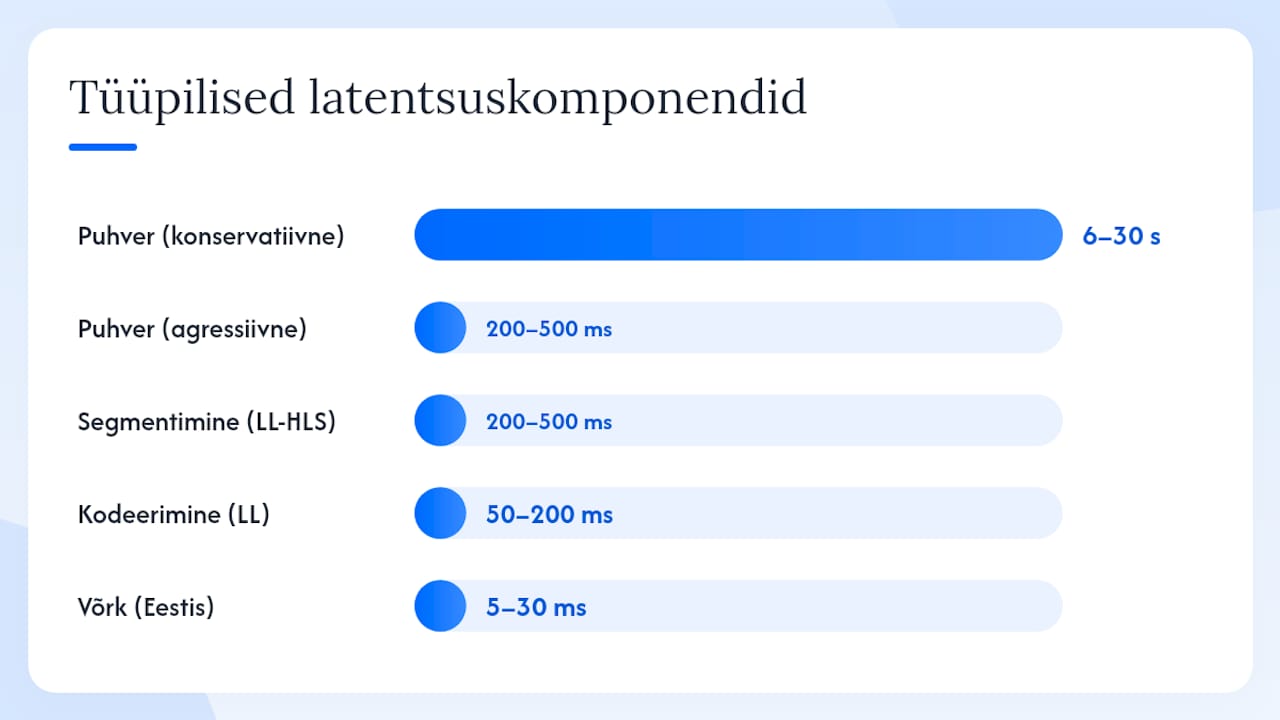
Typical latency components
| Component | Typical range |
|---|---|
| Encoding (low-latency preset) | 50–200 ms |
| Segmentation (LL-HLS partial chunk) | 200–500 ms |
| Network transport (domestic Estonia) | 5–30 ms |
| CDN/edge latency | 10–50 ms |
| Player buffer (aggressive) | 200–500 ms |
| Player buffer (conservative) | 6–30 s |
Which protocol is suitable for your event?
The protocol choice is the single most important decision you make. Everything else is just tuning.
| Minutes | Expected latency | Stability with packet loss | Implementation complexity | Infrastructure requirements | Best use case |
|---|---|---|---|---|---|
| WebRTC | 100–500 ms | Weak (needs TURN) | High (SFU/P2P) | TURN servers, SFU | Interactive: Q&A, auction |
| SRT | 100–500 ms | ARQ | Average | UDP port, SRT server | contribution link, remote production |
| LL-HLS / LL-DASH | 1–5 s | Good (CDN support) | Average | HTTP/2, CDN partial-segment support | Large audience, low latency |
| Traditional HLS | 6–30 s | Very good | Madal | Standard CDN | Broadcast, VOD-style |
| RTMP (ingest) | 1–3 s (ingest) | Average | Madal | RTMP server | Ingest protocol, not final distribution |
WebRTC is the best choice if you need genuine real-time communication. However, things are more complicated when it comes to scaling: P2P works well for up to a few dozen viewers; for larger volumes, you need SFU (Selective Forwarding Unit) architecture. Around 20% of connections cannot be established via P2P due to firewalls and NAT restrictions, which is why planning for TURN servers is essential.
SRT is designed for unstable networks. Selective retransmission means that lost packets are resent without interrupting the entire stream, making SRT ideal for a contribution link from a studio to an ingest point, especially when working with a mobile connection or public Wi-Fi.
LL-HLS and LL-DASH is currently the best compromise between a larger audience and low latency. The partial-segment mechanism sends 200–500 ms chunks before the segment is completed, which cuts traditional HLS latency to a fraction. CDN support is good, but requires HTTP/2 and chunked transfer encoding support.
Traditional HLS gives the most stable picture, but the 6 to 30-second latency makes it suitable only for broadcast-style feeds where the viewer does not expect a real-time response. Dolby OptiView It turns out that new protocols like HESP can bring latency down to approximately 1 second, but they require careful CDN and encoding planning.
RTMP today it is primarily an ingest protocol, rather than for final distribution. OBS and ffmpeg use it to send the signal to a server, from where it is then forwarded using HLS, LL-HLS or another protocol.
How to reduce latency in practice?
Here is the sequence to follow. Do not jump to step 4 if step 1 has not been done.
- Select the correct protocol (cf previous section). This is the single biggest influencer.
- Configure the encoder for low latency.
- Bring the film closer to the viewers using a CDN or edge computing.
- Configure player buffer according to network quality.
- Improve network quality With QoS settings, 5G or a cable connection.
FFmpeg low latency example
ffmpeg -i input.mp4
  -c:v libx264 -preset veryfast -tune zerolatency
  -g 60 -keyint_min 60
  -bf 0
  -c:a aac -b:a 128k
  -f flv rtmp://ingest.server/live/streamkey
-g 60 means a 2-second GOP at 30 fps. -tune zerolatency purges internal buffers. -bf 0 removes B-rolls.
AV1 and HEVC offer better bitrate efficiency, but encoding time is significantly longer. For live streaming, use them only with hardware acceleration (NVENC, QuickSync).
CDN and edge
Chunked transfer encoding is mandatory for LL-HLS/LL-DASH. Without it, the CDN cannot forward partial segments. HTTP/2 multiplexing reduces connection overhead. Regional origin servers in Northern Europe (Frankfurt, Stockholm, Warsaw) are the best choices for Estonian viewers.
FEC and ARQ settings
FEC adds redundant packets that allow lost packets to be recovered without retransmission. This adds a small bitstream overhead, but keeps latency stable. For SRT, configure latency parameter according to the network RTT: usually 3 to 4 times the RTT value.
Professional advice: If you’re using a mobile connection, always reserve 20–30% bits for FEC. The Estonian mobile network is good, but at large events where everyone is using the same mast, packet loss can increase unexpectedly.
How to measure latency accurately?
Measurement is where many make a mistake: they trust the player's statistics, which show only the player-side buffer, not the actual glass-to-glass latency.
Photographic method for glass-to-glass measurement
The simplest and most accurate method: set one device to show the clock with millisecond precision, point a camera at it, and look at the player of the second device to see how big the difference is. Requires no special equipment.
Monitoring thresholds
| Metric | Normal | Warning | Critical |
|---|---|---|---|
| Glass-to-glass (interactive) | at 500 ms | 100–500 ms | 6–30 s |
| glass-to-glass (low latency) | 1–3 s | 3–5 s | over 5 s |
| Jitter | at 20 ms | 20–50 ms | over 50 ms |
| Packets | less than 1% | over 1% | over 2% |
| Player buffer length | 1.5–3 s | 2–5 s | over 5 s |
If the glass-to-glass latency for an interactive event exceeds 1 second, check in order: player buffer → CDN edge location → encoder GOP → network packet loss. The LiveAPI blog describes measurement methods and protocol latency ranges in detail.
How does television work in real life?
For over 10 years, we have produced live streams of conferences, sporting events and live shopping. In that time, we've made enough mistakes to know exactly what not to do. Here is what we actually use.
Conference (Q&A, interactive):
- Protocol: LL-HLS on the platform side, SRT for the contribution link
- Keyframe interval: 1 second
- Player buffer: 1.5–2 seconds (compromise between stability and latency)
- CDN: Northern Europe edge, Frankfurt or Stockholm
Sports competition (large audience, commentary):
- Protocol: LL-HLS
- Keyframe interval: 2 seconds
- Player buffer: 2–3 seconds
- Bitrate: 4–8 Mbps depending on the intensity of movement
Live shopping (real-time reaction):
- Minutes: WebRTC SFU up to 500 viewers, then LL-HLS
- Keyframe interval: 1 second
- TURN servers: always scheduled
Preflight checklist before the event
- Test the ingestion connection at least 30 minutes before the start
- Plan an alternative ingest point (backup RTMP URL)
- Check the power supply: is there sufficient capacity at the location? If not, we will come with our own generator. This is part of our from a sustainable production philosophy, where we plan energy use in advance, rather than reacting to the crisis on site.
- Measure the RTT to the ingest server: it should be under 50 ms from Estonia to Northern European servers
- Check for packet loss: over 1% requires an increase in FEC
- Test the player on three different networks (cable, Wi-Fi, 4G)
„Latency is like the weather: you can't fully control it, but you can prepare for it. Our pre-flight process is what separates a professional broadcast from an amateur one — not the equipment, but the preparation. And when a streamer knows how to interact with the audience, even a 3-second latency becomes almost unnoticeable to the viewer. Television.ee live broadcast production
Rando Mere describes live broadcasting as a technical sport: every detail counts, and the best results come from preparation, not improvisation.
When to accept higher latency?
Not every event requires WebRTC. In fact, for most events, LL-HLS is completely adequate, and for some, even traditional HLS is more suitable than a low-latency solution.
Decision matrix
| User guide | Recommended latency | Minutes | Reason |
|---|---|---|---|
| Live Q&A, auction | at 500 ms | WebRTC | The viewer's reaction must be immediate |
| Sports competition, commentary | 1–5 s | LL-HLS | Large audience, stability important |
| Conference, webinar | 1–5 s | LL-HLS / SRT | Moderate interactivity |
| Broadcast, festival | 6–30 s | HLS | Maximum stability and scalability |
| Contribution link (from studio to server) | 100–500 ms | SRT | Unstable network, requires ARQ |
Particularities of Estonian grid codes
Due to Estonia's geographical size, latency in local networks is very low. With Northern European CDN servers, the RTT is relatively low, which provides a good foundation for low latency. 5G coverage is growing, but at major events, it must be taken into account that all viewers are using the same mast, which can cause jitter issues.
Using local CDN services and telecom operators reduces geographic latency, but requires careful planning: does the CDN support the LL-HLS partial-segment mechanism? Is HTTP/2 enabled? It is worth going through these questions before the event.
Scaling recommendation: Conduct a test audit at least a week before the big event. Measure glass-to-glass latency, jitter and packet loss under real-world conditions. Don't rely solely on lab results.
Main conclusions
Proper protocol selection, encoder settings, and CDN location, together with measurement, are the four pillars upon which every low-latency live broadcast relies.
| Point | Details |
|---|---|
| Selecting a protocol is the first step | WebRTC under 500 ms, LL-HLS 2–5 s, traditional HLS 6–30 s. |
| The encoder settings take effect immediately | A keyframe interval of 1–2 seconds and disabling B-frames reduces latency without infrastructure changes. |
| The CDN edge location is critical | Northern European servers (Frankfurt, Stockholm) give 20–40 ms RTT from Estonia. |
| Measure glass-to-glass, not just the buffer | The two-device photo method is the simplest and most accurate way to check actual latency. |
| Television provides a complete solution | Audit, test, deploy and support with a local power supply, if infrastructure is missing. |
Why do we in Estonia often choose precisely these solutions
Honestly: we've already made most of the mistakes ourselves, so you don't have to. Over ten years, we've learned that in the Estonian context, some choices are simply more sensible than others.
Serverless computing and regional origin servers in Northern Europe are not just a matter of latency. They also reduce data transfer volume and the carbon footprint, because content does not have to travel halfway across the world. We generate our own electricity, optimise logistics and even use a minimum of single-use gaffer tape. The same logic applies to infrastructure choices: the closest server that gets the job done is always a better choice than a more distant, more powerful, but more resource-intensive alternative.
For the client, this means fewer risks and fewer surprises. When we say that latency is under 3 seconds, that is measured, not calculated. And if something goes wrong, we are there, not in another time zone.
Technical optimisation is important, but it does not replace good audience management. Streamer skills Yes, audience engagement makes even a 3-second latency almost unnoticeable to the viewer when communication is smooth and the streamer knows how to keep viewers hooked.
Television helps you to professionally resolve latency
Latency optimisation sounds complicated, but it doesn't have to be your problem. Television is big enough to cope, and small enough to care that your system runs without worry for years.

Our approach is simple: audit → test → deploy → support. We start by measuring your current glass-to-glass latency and identifying bottlenecks. We then recommend the protocol, encoder settings and CDN configuration according to your event type and audience. If there is no infrastructure at the venue, we come with our own power supply. If you need streaming platform, which supports the LL-HLS partial-segment mechanism and Northern European edge servers, we have it.
Conferences, sports competitions, live shopping, podcasts: we’ve done it all and know where things go wrong. Get in touch and let's do a quick technical audit so you know exactly what you are dealing with. Check out our live streaming service and write to us about what your event is.
Authoritative sources for further reading
If you want to delve deeper, here are the sources this article relies on that will help you research further:
Standards and RFCs:
- RFC 9317: Operational Considerations for Streaming Media — authoritative technical framework on network operations and QoE impact
Protocol comparisons and practical guides:
- GetStream: Low Latency Video Streaming — A practical comparison of WebRTC buffers and protocols
- LiveAPI: What Is Video Latency? — glass-to-glass definition and measurement methods
- Dolby OptiView: What is Low Latency Video Streaming? — Overview of HESP and new protocols with CDN requirements
- YouTube Help: Understand live streaming latency — YouTube latency levels and trade-offs